
Cosmic Bills App for Reckon Hosted — Australia
Cosmic Bills automates your bills. It removes the painful part of accounts payable — entering bills with multiple line items by hand — so you can reduce what accounts payable costs you and get the routine work off your team.
Did you create the API user in your Reckon data file?
Reckon's API needs a dedicated user inside your own company file, with full access. Choose your own username and password for it — do not reuse the ones the previous version of this page published.
Get your first bills scanned free.
Registering Cosmic Bills against your Reckon data file
- 1.Create a new user inside your Reckon data file and give it full access.
- 2.Choose a username and password of your own for that user, and keep them private.
- 3.Select your company data file from the dropdown in the Cosmic Bills setup panel — there is no need to copy and paste the path.
This is how Cosmic Bills integrates with your Reckon data file. We do not have access to your data file. It is a Reckon API requirement only.
Walkthroughs
How to do product mapping
Seven more walkthroughs are being re-hosted
These are served as video files from the old website, which is being retired, so they are not embedded here. They cover:
- Registering Cosmic Bills against your Reckon data file
- Using the first upload option for best performance
- Item mapping, so bills can track stock items
- Selecting your data file from the dropdown, with no copying and pasting
- Adding a supplier ABN and tax code
- Processing bills into Reckon Hosted
- Connecting Cosmic Bills to Reckon Hosted
Ask us and we will send you the walkthrough you need.
Two ways to get your bills scanned
Upload, then approve
Upload your bills and sign out. You are emailed when they have been scanned, and you approve and post them yourself.
Upload and leave it to us
Upload and sign out. We run the whole process, post to Reckon Hosted, and confirm by email.
- Set bill items to track stock items in your data file.
- Find the PDF view and download it from scan history.
- Add a supplier ABN and tax code in the supplier box.
- Use chart of accounts, class and customer job together.
Adding an ABN and tax code in the supplier box
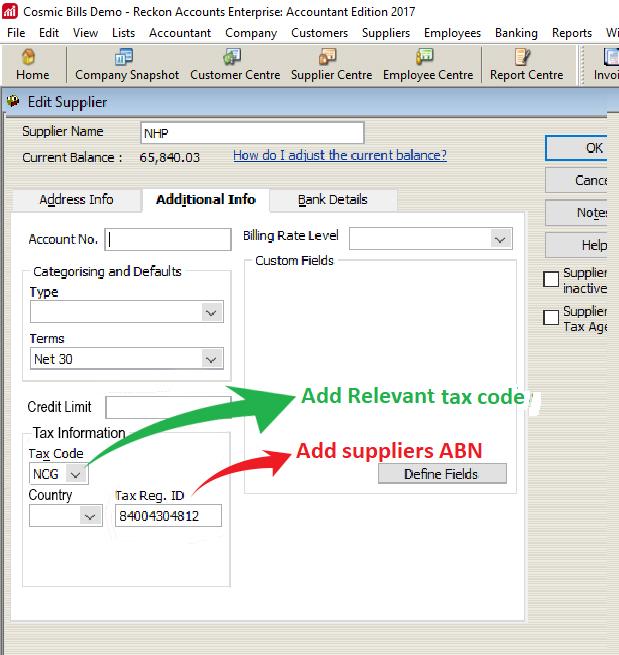
NCG or NCF — before its bills can be matched and coded.Try it against our demo first
The previous version of this page published a shared demo username and password, and a set of sample supplier PDFs. The credentials are not reproduced — a login published on a public page is available to anyone who finds it.
Ask us for demo access and we will set you up with your own.
Take the initial step
Accounts payable is an important and time-sensitive requirement for any medium to large business. Reducing the effort it takes reduces its cost, and frees the same people for the work that needs their judgement.

Start using Cosmic Bills today
Book one of our free introductory consultations to see how we can help you.
Why businesses use Cosmic Bills

Save money
Cosmic Bills was built to help businesses spend less on processing bills. Rather than hiring someone to key invoices, the extraction does the typing and your team checks the result.

Save time
A bill with twenty lines takes as long to type as a bill with one takes to check. Pulling the detail off the document removes the slow part and leaves the part that needs judgement.
User friendly interface
The scanning runs on machine learning, but that does not make it complicated to use. The interface is a four-step flow and takes very little training to pick up.
Our story
We have been involved in accounting technology for more than 25 years. Cosmic Bills is a division of Cosmic Innovations and Cosmic Accounting Group.
Cosmic Innovations is the branding arm that promotes all software development.
Cosmic Accounting Group has two experienced partners: Chandra Wasan (FIPA, CTA) and George Vourantonis (CA, Registered Auditor).